|
#!/bin/sh |
|
|
|
# Set the icons and branding |
|
selfServiceBrandIcon="/Users/$3/Library/Application Support/com.jamfsoftware.selfservice.mac/Documents/Images/brandingimage.png" |
|
fileVaultIcon="/System/Library/CoreServices/CoreTypes.bundle/Contents/Resources/FileVaultIcon.icns" |
|
|
|
if [[ -f $selfServiceBrandIcon ]]; then |
|
brandIcon="$selfServiceBrandIcon" |
|
else |
|
brandIcon="$fileVaultIcon" |
|
fi |
|
|
|
# Start by setting result to UNDEFINED |
|
result="UNDEFINED" |
|
|
|
MissingSecureTokenCheck() { |
|
|
|
# Get the currently logged-in user and go ahead if not root. |
|
userName=$(/bin/ls -l /dev/console | /usr/bin/awk '{ print $3 }') |
|
|
|
# This function checks if the logged-in user has Secure Token attribute associated |
|
# with their account. If the token_status variable returns "0", then YES is set. |
|
# If anything else is returned, NO is set. |
|
if [[ -n "${userName}" && "${userName}" != "root" ]]; then |
|
|
|
# Get the Secure Token status. |
|
token_status=$(/usr/sbin/sysadminctl -secureTokenStatus "${userName}" 2>&1 | /usr/bin/grep -ic enabled) |
|
|
|
# If there is no secure token associated with the logged-in account, |
|
# the token_status variable should return "0". |
|
if [[ "$token_status" -eq 0 ]]; then |
|
result="NO" |
|
fi |
|
|
|
# If there is a secure token associated with the logged-in account, |
|
# the token_status variable should return "1". |
|
if [[ "$token_status" -eq 1 ]]; then |
|
result="YES" |
|
fi |
|
fi |
|
|
|
# If unable to determine the logged-in user |
|
# or if the logged-in user is root, then UNDEFINED is returned |
|
} |
|
|
|
MissingSecureTokenCheck |
|
|
|
if [[ $result = "NO" ]]; then |
|
# Current user does not have a secure token. Need to generate one. |
|
# Granting user needs to be an admin. Get all the admin users on the computer. |
|
adminUsers=$(dscl . read /Groups/admin GroupMembership | cut -d " " -f 2-) |
|
|
|
# For each user, check if they have a secure token |
|
for EachUser in $adminUsers; do |
|
|
|
TokenValue=$(sysadminctl -secureTokenStatus $EachUser 2>&1) |
|
|
|
if [[ $TokenValue = *"ENABLED"* ]]; then |
|
SecureTokenUsers+=($EachUser) |
|
fi |
|
|
|
done |
|
|
|
# List out the users with a secure token |
|
if [[ -z "${SecureTokenUsers[@]}" ]]; then |
|
# If no secure token admin users, show dialog stating such |
|
/usr/bin/osascript -e "display dialog \"\" & return & \"There are no secure token admin users on this device.\" with title \"Grant Secure Token\" buttons {\"OK\"} default button 1 with icon POSIX file \"$brandIcon\"" |
|
exit 0 |
|
else |
|
# Have user select a secure token user they know the password for |
|
adminUser=$( osascript -e "set ASlist to the paragraphs of \"$(printf '%s\n' "${SecureTokenUsers[@]}")\"" -e 'return choose from list ASlist with prompt "Select a user you know the password for:"' ) |
|
|
|
# Get a secure token users password |
|
adminPassword=$( /usr/bin/osascript -e "display dialog \"To grant a secure token\" & return & \"Enter login password for '$adminUser'\" default answer \"\" with title \"Grant Secure Token\" buttons {\"Cancel\", \"Ok\"} default button 2 with icon POSIX file \"$brandIcon\" with text and hidden answer |
|
set adminPassword to text returned of the result |
|
return adminPassword") |
|
|
|
# Exit if user cancels |
|
if [ "$?" != "0" ] ; then |
|
echo "User aborted. Exiting…" |
|
exit 0 |
|
fi |
|
fi |
|
|
|
# Try the entered password |
|
passCheck=`dscl /Local/Default -authonly "${adminUser}" "${adminPassword}"` |
|
|
|
# If the credentials pass, continue, if not, tell user password is incorrect and exit. |
|
if [ "$passCheck" == "" ]; then |
|
echo "Password Verified" |
|
else |
|
echo "Password Verification Failed. Please try again." |
|
/usr/bin/osascript -e "display dialog \"\" & return & \"Password Verification Failed. Please try again.\" with title \"Grant Secure Token\" buttons {\"OK\"} default button 1 with icon POSIX file \"$brandIcon\"" |
|
exit 1 |
|
fi |
|
|
|
# Get the logged in user's password via a prompt |
|
echo "Prompting ${userName} for their login password." |
|
|
|
userPassword=$( /usr/bin/osascript -e "display dialog \"To grant a secure token\" & return & \"Enter login password for '$userName'\" default answer \"\" with title \"Grant Secure Token\" buttons {\"Cancel\", \"Ok\"} default button 2 with icon POSIX file \"$brandIcon\" with text and hidden answer |
|
set userPassword to text returned of the result |
|
return userPassword") |
|
|
|
# Exit if user cancels |
|
if [ "$?" != "0" ] ; then |
|
echo "User aborted. Exiting…" |
|
exit 0 |
|
fi |
|
|
|
echo "Granting secure token." |
|
|
|
# Grant the token |
|
sysadminctl -secureTokenOn ${userName} -password ${userPassword} -adminUser ${adminUser} -adminPassword ${adminPassword} |
|
|
|
# Check for bootstrap token escrowed with Jamf Pro |
|
bootstrap=$(profiles status -type bootstraptoken) |
|
|
|
if [[ $bootstrap == *"escrowed to server: YES"* ]]; then |
|
echo "Bootstrap token already escrowed with Jamf Pro!" |
|
else |
|
# Escrow bootstrap token with Jamf Pro |
|
echo "No Bootstrap token present. Escrowing with Jamf Pro now…" |
|
sudo profiles install -type bootstraptoken -user "${adminUser}" -pass "${adminPassword}" |
|
fi |
|
|
|
elif [[ $result = "YES" ]]; then |
|
echo "Current user already has a secure token. No action necessary." |
|
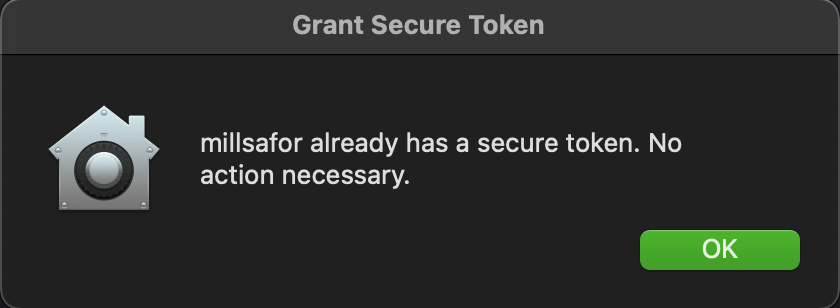
/usr/bin/osascript -e "display dialog \"\" & return & \"$userName already has a secure token. No action necessary.\" with title \"Grant Secure Token\" buttons {\"OK\"} default button 1 with icon POSIX file \"$brandIcon\"" |
|
else |
|
echo "Undefined secure token status" |
|
/usr/bin/osascript -e "display dialog \"\" & return & \"Could not determine secure token status.\" with title \"Grant Secure Token\" buttons {\"OK\"} default button 1 with icon POSIX file \"$brandIcon\"" |
|
exit 1 |
|
fi |



 Mostly Mac